Start with the work your agency actually does
An agency selling its own services needs a different setup from an agency operating outreach for several clients. Write down which business owns each sending address, who reviews drafts, and who answers a positive reply. Then decide where those records should live. A seat count alone will not tell you whether the software fits.
For a three-person agency, a useful trial has one researcher, one person approving messages, and one person handling conversations. A platform should help those people finish their work without guessing whether a prospect has already replied or asked to stop.
Match the tool to your main job
| Your main job | What to test before paying |
|---|---|
| Research a small list and send personal emails | Company context, email verification, editable drafts and review before launch |
| Hand replies to another teammate | Read access to the sending mailbox, assignment, internal notes and the original thread |
| Operate outreach for separate clients | Workspace boundaries, client membership, mailbox ownership and separate billing |
| Combine email, calls and LinkedIn steps | The exact channels in the plan you are considering |
| Send at high volume | Provider restrictions, mailbox health, pacing and the total operational cost |
Reach-book.com covers prospect research, verified email lookups, AI-assisted drafts, email sequences and a shared outreach inbox. It does not automate LinkedIn outreach or provide a calling sequence. If those channels are essential to your service, include a multichannel tool in your shortlist. Our lemlist comparison explains that decision in more detail.
Walk through one small campaign
Use a narrow segment for your evaluation, such as twenty software companies whose founders might need your agency’s service. This is an example audience size, not a prediction of replies. Establish that you can contact the recipients before sending; an address being deliverable does not establish permission to market to it.
- Add the companies. Import a CSV or create prospect records. Check company names, websites and the person responsible for the buying decision. Keep one person responsible for each record so two teammates do not work the same account by accident.
- Find and review email addresses. Look at the verification status. Resolve missing or risky addresses before adding them to a sending audience. Read how to find someone’s email if your list starts with names and domains.
- Prepare the message. Use your business profile and prospect research to draft an introduction. Edit any AI suggestion. Confirm that the opening refers to a real, relevant detail and that the offer matches what your agency delivers.
- Build the sequence. Add a first email and a follow-up for prospects who have not replied. In the visual editor, check the delay and any condition that sends people down different paths. Review both branches if you add a condition.
- Review the audience and launch settings. Confirm the sending mailbox, working days, timezone and daily capacity. Use the launch checklist and read the approved messages before starting.
- Handle the reply. Open the conversation in Inbox, assign the next person and add a note describing the next action. Confirm that this teammate can read the mailbox’s conversations.
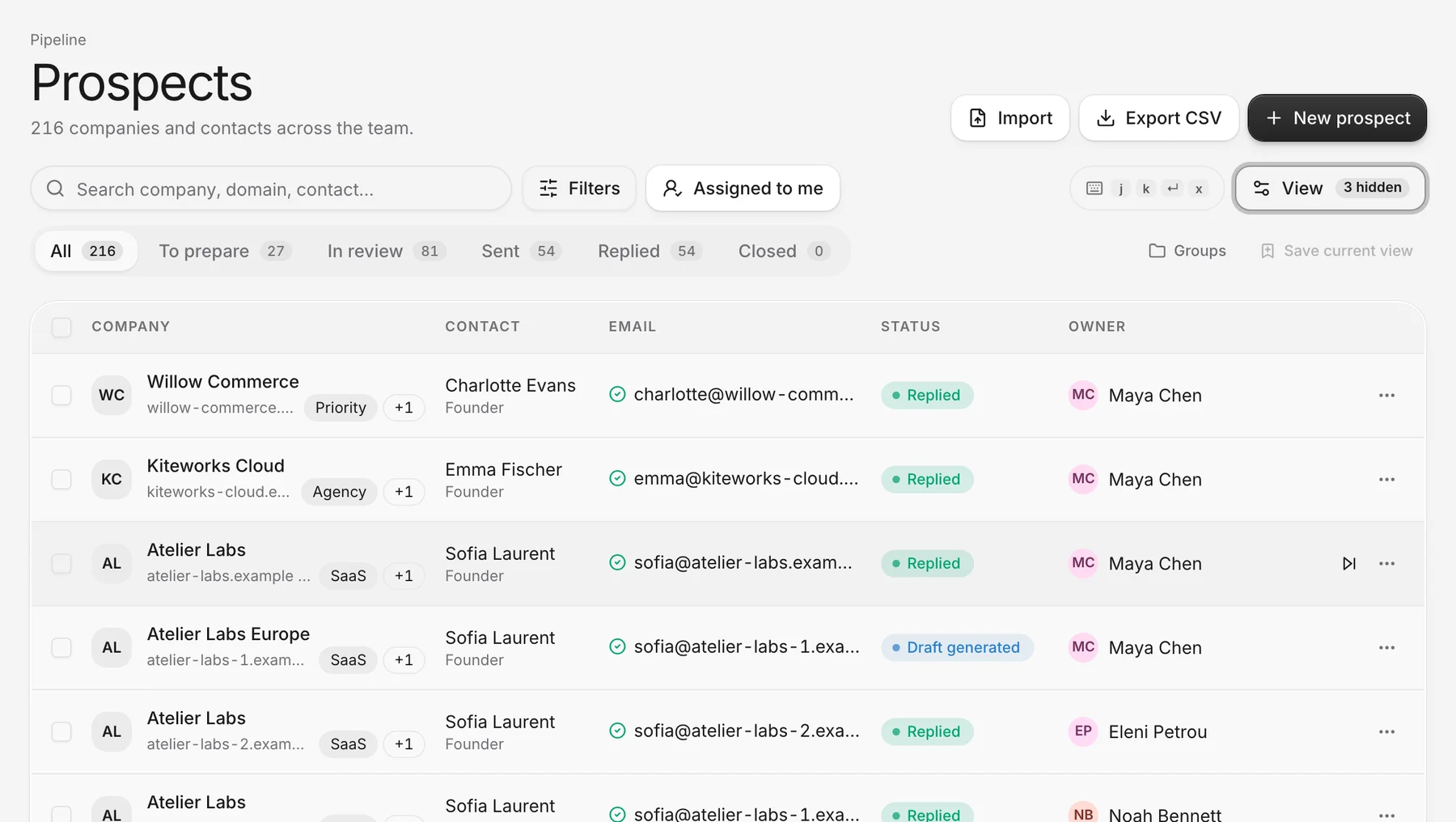
The screenshot above shows the records behind this process: the contact, email status and owner appear on one row. It demonstrates how the product presents the work. It does not demonstrate a successful delivery or a sales outcome.
Test the handoff, including a failed handoff
Create a test conversation with an address your team controls. Have Maya, the sender in our example, hand it to Noah. Noah needs Read conversations access to Maya’s mailbox to see the thread. Assignment alone does not grant it. Give Send access separately if Noah should use that address for outreach.
Next, remove access in your evaluation workspace and confirm that the person can no longer read the conversation. This is a better buying test than counting the number of people a plan supports. The distinction matters when contractors help with research but should not see client conversations.
The opt-outs and team inboxes guide follows that handoff and explains the workspace-wide do-not-contact list. Check these controls with the roles your team will use, rather than testing everything as an administrator.
Price the complete month
Use the current pricing page for seats and allowances. Budget for email lookups, enrichment and AI writing as separate types of usage. Sending from an existing mailbox does not mean your mailbox subscription or domain registration comes with Reach-book.com.
For example, list the number of people who need access and the number of new addresses you expect to look up. Add repeat research and occasional busy periods. Compare monthly billing with the annual commitment, and check how allowance pools and top-ups work. A low headline price can be a poor fit if the activity you need consumes a different allowance from the one advertised.
Keep client costs separate in the calculation. A workspace is a boundary for its records, members and settings. Do not assume that one subscription supplies independent, fully configured client workspaces or a client-facing portal. Decide how clients should participate before choosing the structure.
Know the limits before you choose
Campaigns support up to 500 prospects, 10 email steps and 20 sender mailboxes. Gmail and Microsoft 365 connections support reply tracking and automated follow-ups, and so does an SMTP mailbox once you add its IMAP details. Without IMAP, SMTP connections send single emails; they cannot run follow-up campaigns or sync replies. Microsoft 365 does not accept password sign-in over IMAP, so use Microsoft sign-in there. Our Microsoft 365 walkthrough covers that setup.
Reply checks run on a schedule, every ten minutes by default. They are not a live feed of every message in the mailbox. The inbox covers conversations Reach-book.com started. It does not replace a general help desk or your complete email inbox.
Make the decision from a completed workflow
Finish your evaluation by checking five results: a reviewed prospect record, an approved sequence, a reply visible to the correct teammate, a recorded opt-out, and a cost estimate that includes the whole team. Note where someone needed a workaround.
Choose Reach-book.com if those steps match the service your agency delivers and the limits fit your intended workload. Keep another tool on the shortlist if a missing channel or access model creates extra daily work. A completed handoff tells you more than a long feature checklist.